GPT Image 2
Image Upload
Quality
Resolution
Ratio
Your image will appear here
Image History
GPT Image 2 Workspace Preview
Explore prompts, image references and model settings in one workspace. Generated results appear in Create; the examples below are creative references.
Core Features of GPT Image 2 AI Model
Creative reference: explore these model capabilities and possible uses. Availability in Paevon will be confirmed when generation opens.
Core Features of GPT Image 2 AI Model
Through deep coupling of underlying logic and visual generation, this model provides reliable technical assurance for visual creation requiring high rigor.

Zero-Bias Text and Symbol Processing
Leverages enhanced language decoding to ensure every character, digit, and special symbol in the image is highly recognizable. This is ideal for data dashboards and complex signage, ensuring accurate information delivery.

Scene-Aware Consistent Editing
When performing local reconstruction, the system automatically perceives surrounding material properties and light distributions. Intelligent inpainting ensures new elements merge smoothly at the pixel level, maintaining a seamless 4K visual whole.

Deep Integration of Industry Knowledge
Trained for logical reinforcement, the model understands complex physical laws and structures. Generated content maintains professional standards in anatomy, geography, and mechanics, broadening AI's role in education and research.
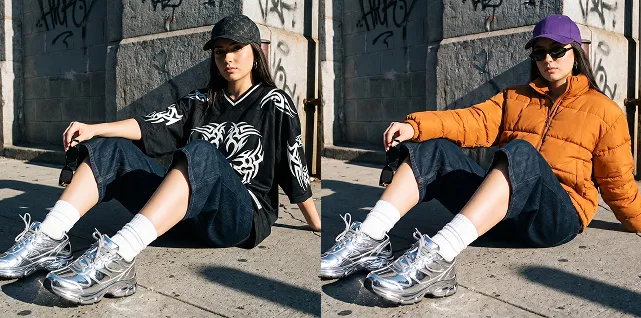
Advantages of GPT Image 2 AI Model
Creative reference: explore these model capabilities and possible uses. Availability in Paevon will be confirmed when generation opens.
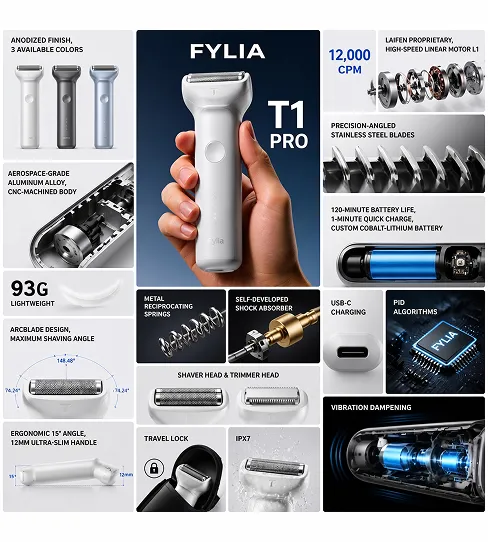
Optimization of Logical Consistency
Generated images effectively avoid structural misalignments or perspective biases common in traditional models. This stability allows assets to withstand detailed scrutiny by professionals, enhancing authority.
Balance Between Speed and Quality
Despite high resolution, the system maintains sub-second processing responses. This allows creators to see results quickly even for complex 4K rendering tasks, improving project efficiency.
High Sensitivity to Instruction Following
Precise feedback is given for slight variations in position, scale, and color brightness descriptions. This control is essential for creators seeking perfection, ensuring the final output matches the intended visual hierarchy.
Production-Grade Resolution Support
Native output meets commercial print and HD digital media standards. Sharpness and color depth are industry-leading, making it the ideal choice for high-specification visual content.
Application Scenarios of GPT Image 2 AI Generator
Creative reference: explore these model capabilities and possible uses. Availability in Paevon will be confirmed when generation opens.
Professional Educational Illustrations
Produces clearly labeled, logically sound anatomical structures, astronomical models, or physics demonstrations. This enhances the appeal of teaching materials while ensuring objectivity and accuracy.
Historical Reconstruction and Mapping
Assists researchers or publishers in generating highly restored historical architectural views or precise topographical maps. Its understanding of geographical features and ancient scripts provides a unique advantage.
High-Precision Visual Effect Renders
Provides high-definition mood boards for film pre-production and game scene design. Precise control over light and material helps teams establish a unified visual benchmark early on.
Technical Manual Illustrations
Automatically generates annotated equipment operation diagrams, process breakdowns, and safety signs. The clear, legible content significantly lowers the difficulty of producing technical documentation.
Usage Steps of GPT Image 2 AI Generator
Preview the creation workflow. You can prepare inputs now; generation and downloads will be available after service launch.
Step 1
Access the interface and ensure the world-knowledge-powered GPT Image 2 engine is selected.
Step 2
Enter prompts containing specific layout requirements and physical features, and set the resolution level.
Step 3
Start the task to obtain structurally sound, text-clear 4K professional visual assets.